
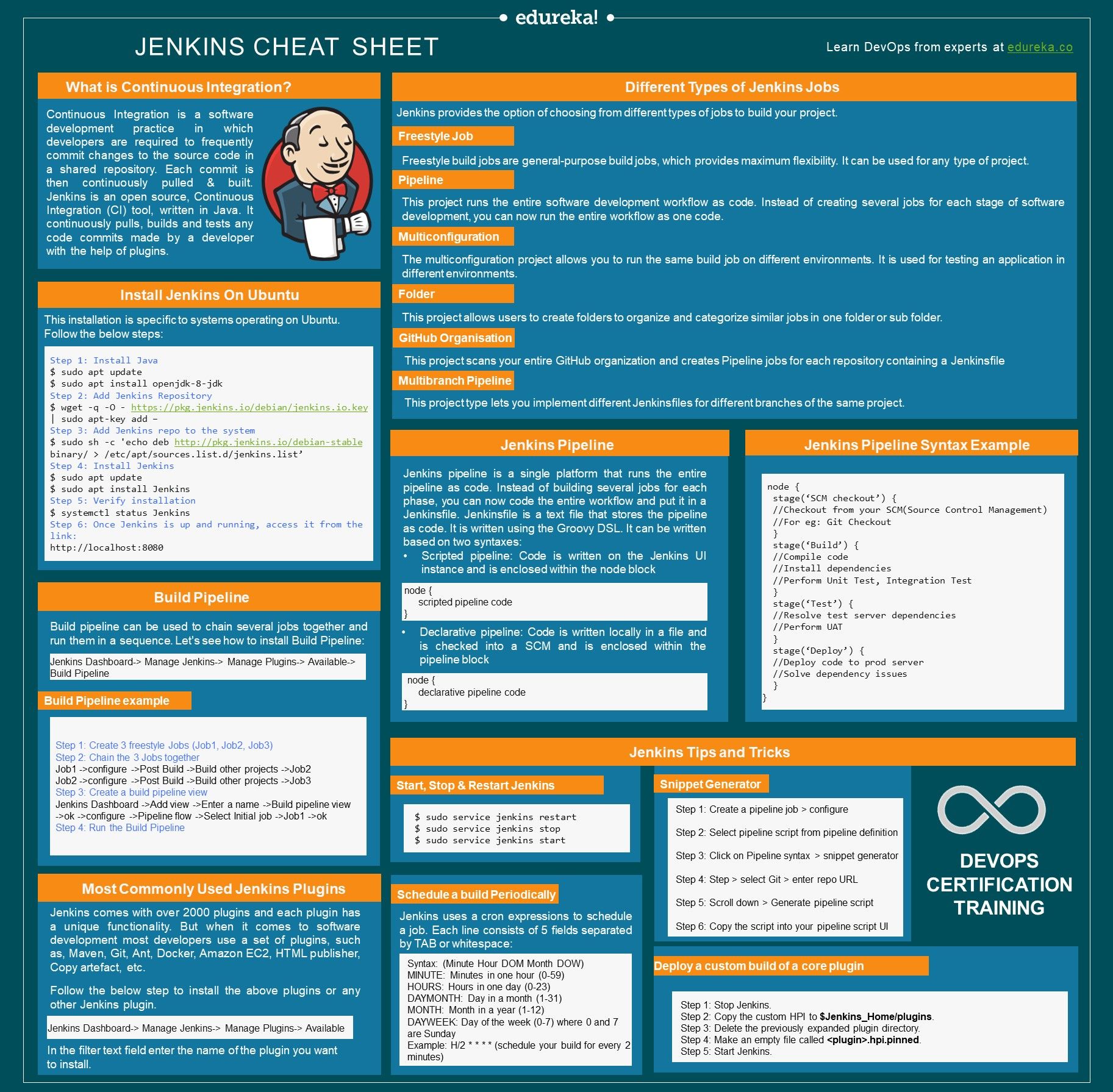
What does the Certified Jenkins Engineer exam cover?
The Certified Jenkins Engineer (CJE) exam covers Jenkins installation, configuration, pipelines, Jenkinsfile syntax, distributed builds, plugins, security, and CloudBees features. It validates skills in building and managing CI/CD pipelines with Jenkins. The exam consists of 60 questions over 90 minutes and costs $150 USD through CloudBees.
The Certified Jenkins Engineer (CJE) is the official certification for Jenkins CI/CD expertise, offered by CloudBees (the enterprise Jenkins company). Jenkins remains the most widely deployed open-source CI/CD tool globally, used in thousands of enterprise development pipelines.
DevOps engineers, build engineers, and platform engineers with Jenkins certification demonstrate verified CI/CD pipeline expertise. The exam costs $150 USD and covers Jenkins administration, pipeline development, distributed builds, and enterprise security features.
Exam Overview
| Detail | Information |
|---|---|
| Certification | Certified Jenkins Engineer (CJE) |
| Provider | CloudBees |
| Number of Questions | 60 |
| Time Limit | 90 minutes |
| Passing Score | 66% |
| Cost | $150 USD |
| Prerequisites | 6-12 months Jenkins experience recommended |
| Validity | 2 years |
Key exam topics:
- Key CI/CD/Jenkins concepts
- Jenkins usage (features, jobs)
- Building Continuous Delivery (CD) Pipelines
- CD Pipeline Advanced Features
- Distributed Builds
- CloudBees and Jenkins Security
Jenkins Architecture
Master (Controller) and Agent Architecture
Jenkins controller (formerly called master):
- Hosts the Jenkins web UI
- Manages build configuration and job scheduling
- Stores build history and artifacts
- Coordinates build distribution to agents
Jenkins agents (formerly called slaves):
- Execute build tasks assigned by the controller
- Can run on any OS supporting Java
- Types: permanent agents (dedicated machines), cloud agents (dynamically provisioned), Docker agents (containers)
JNLP (Java Network Launch Protocol): Agents connect to the controller using JNLP to receive work and report results.
Jenkins Configuration
System configuration (Manage Jenkins > Configure System):
- JDK and Maven installations
- Global environment variables
- Email notification settings
- Build artifact retention policies
Global Tool Configuration:
// In Jenkins global tool configuration
node {
    def mvnHome = tool 'Maven-3.9'
    env.PATH = "${mvnHome}/bin:${env.PATH}"
    sh 'mvn clean package'
}
Jenkinsfile and Pipeline Syntax
Declarative vs. Scripted Pipeline
Declarative Pipeline (recommended for most use cases):
pipeline {
    agent any

    environment {
        DOCKER_IMAGE = "myapp:${BUILD_NUMBER}"
        AWS_REGION = "us-east-1"
    }

    stages {
        stage('Checkout') {
            steps {
                checkout scm
            }
        }

        stage('Build') {
            steps {
                sh 'mvn clean package -DskipTests'
            }
        }

        stage('Test') {
            steps {
                sh 'mvn test'
            }
            post {
                always {
                    junit 'target/surefire-reports/*.xml'
                }
            }
        }

        stage('Docker Build') {
            steps {
                script {
                    docker.build(env.DOCKER_IMAGE)
                }
            }
        }

        stage('Deploy to Staging') {
            when {
                branch 'main'
            }
            steps {
                sh "kubectl set image deployment/myapp app=${DOCKER_IMAGE}"
            }
        }
    }

    post {
        success {
            slackSend message: "Build ${BUILD_NUMBER} succeeded!"
        }
        failure {
            emailext subject: "Build Failed: ${JOB_NAME} #${BUILD_NUMBER}",
                     body: "${BUILD_URL}",
                     to: "team@company.com"
        }
    }
}
Scripted Pipeline (more flexible, Groovy-based):
node('linux-agent') {
    stage('Checkout') {
        checkout scm
    }

    stage('Build') {
        try {
            sh 'make build'
        } catch (Exception e) {
            currentBuild.result = 'FAILURE'
            throw e
        }
    }
}
Advanced Pipeline Features
Parallel Execution
pipeline {
    agent any
    stages {
        stage('Parallel Tests') {
            parallel {
                stage('Unit Tests') {
                    steps {
                        sh 'mvn test -Dtest=UnitTests'
                    }
                }
                stage('Integration Tests') {
                    agent { label 'integration-agent' }
                    steps {
                        sh 'mvn test -Dtest=IntegrationTests'
                    }
                }
                stage('Security Scan') {
                    steps {
                        sh 'trivy image myapp:latest'
                    }
                }
            }
        }
    }
}
Shared Libraries
Shared libraries enable reusable pipeline code across multiple projects:
jenkins-shared-library/
  vars/
    buildAndPush.groovy      # Global function
    deployToKubernetes.groovy
  src/
    com/company/
      BuildUtils.groovy      # Groovy class
  resources/
    templates/
      Dockerfile.template
Usage in Jenkinsfile:
@Library('my-shared-library') _

pipeline {
    agent any
    stages {
        stage('Build and Push') {
            steps {
                buildAndPush(
                    image: 'myapp',
                    registry: 'registry.company.com'
                )
            }
        }
    }
}
Input and Approval Steps
stage('Deploy to Production') {
    steps {
        input message: 'Deploy to production?',
              ok: 'Deploy',
              submitter: 'ops-team,manager-group'

        sh 'kubectl apply -f k8s/production/'
    }
}
Distributed Builds
Agent Configuration
Static agents (permanent connections):
- Configured via Manage Jenkins > Manage Nodes and Clouds
- Launch methods: SSH (preferred for Linux), JNLP (preferred for Windows), command-line
Dynamic agents (cloud-provisioned):
pipeline {
    agent {
        docker {
            image 'maven:3.9-eclipse-temurin-17'
            label 'docker-enabled'
            args '-v /root/.m2:/root/.m2'
        }
    }
}
Kubernetes agents (via Kubernetes plugin):
pipeline {
    agent {
        kubernetes {
            yaml '''
apiVersion: v1
kind: Pod
spec:
  containers:
    - name: maven
      image: maven:3.9
      command: ["cat"]
      tty: true
    - name: docker
      image: docker:dind
      securityContext:
        privileged: true
'''
        }
    }
    stages {
        stage('Build') {
            steps {
                container('maven') {
                    sh 'mvn clean package'
                }
            }
        }
    }
}
Jenkins Security
Authentication and Authorization
Authentication options:
- Jenkins's own user database
- LDAP integration for enterprise directory
- Active Directory integration
- GitHub OAuth, SAML SSO
Authorization strategies:
- Matrix-based security: Fine-grained permissions for each user or group
- Role-based authorization (Role Strategy Plugin): Define roles and assign them to users
- Project-based matrix authorization: Different permissions for different projects
Securing Jenkins
| Security Area | Best Practice |
|---|---|
| Access to Jenkins URL | Reverse proxy with HTTPS; restrict network access |
| Authentication | Require strong passwords or SSO; disable anonymous access |
| Agent communication | Use JNLP with certificate authentication |
| Secret management | Use Jenkins credentials store; never hardcode in Jenkinsfile |
| Plugin updates | Regularly update plugins to address security vulnerabilities |
| Audit logging | Enable audit trail plugin for compliance |
Jenkins credentials:
pipeline {
    environment {
        AWS_CREDENTIALS = credentials('aws-production-credentials')
        DOCKER_HUB_CREDS = credentials('dockerhub-credentials')
    }
    stages {
        stage('Push Image') {
            steps {
                sh "echo ${DOCKER_HUB_CREDS_PSW} | docker login -u ${DOCKER_HUB_CREDS_USR} --password-stdin"
                sh "docker push myapp:${BUILD_NUMBER}"
            }
        }
    }
}
Frequently Asked Questions
Is Jenkins still relevant with GitHub Actions and GitLab CI being so popular? Jenkins remains highly relevant, especially in enterprise environments with existing Jenkins investments and complex multi-platform build requirements. Jenkins offers greater customization, self-hosted control, and a vast plugin ecosystem. GitHub Actions and GitLab CI are simpler to set up for new projects and tightly integrated with their respective platforms. Both approaches coexist in the market and the CJE demonstrates valuable expertise regardless.
What is the difference between CJE and CloudBees CI certification? CJE (Certified Jenkins Engineer) focuses on open-source Jenkins knowledge. CloudBees CI is the enterprise distribution of Jenkins with additional features like Operations Center, RBAC, and bundle management. CloudBees also offers a CloudBees CI certification that tests the enterprise-specific features. Most employers are satisfied with CJE for demonstrating Jenkins competency.
How many plugins should I know for the CJE exam? You should be familiar with the most commonly used plugins: Git plugin, Maven Integration, Pipeline, Blue Ocean, Kubernetes plugin, Docker Pipeline, Role Strategy, Credentials, Build Timeout, Timestamper, and Slack Notification. The exam does not test obscure plugin configurations but does test concepts implemented by these core plugins.
References
- CloudBees. (2025). Jenkins Engineer Certification (CJE). https://www.cloudbees.com/jenkins/certification
- Jenkins. (2025). Jenkins Documentation. https://www.jenkins.io/doc/
- Smart, J. (2023). Jenkins: The Definitive Guide. O'Reilly Media.
- Jenkins. (2025). Pipeline Syntax Reference. https://www.jenkins.io/doc/book/pipeline/syntax/
- CloudBees. (2025). Jenkins Security Handbook. https://www.jenkins.io/doc/book/security/
- Leszko, R. (2022). Continuous Delivery with Docker and Jenkins. Packt Publishing.
Frequently Asked Questions
What does the Certified Jenkins Engineer exam cover?
The CJE covers Jenkins installation, configuration, Jenkinsfile and pipeline syntax, distributed builds, shared libraries, plugins, security including credentials management, and CloudBees features. The 90-minute exam has 60 questions and costs $150 USD with a 66% passing score.
Is Jenkins still relevant with GitHub Actions and GitLab CI being so popular?
Jenkins remains highly relevant especially in enterprise environments with existing investments and complex multi-platform requirements. It offers greater customization and a vast plugin ecosystem. GitHub Actions and GitLab CI are simpler for new projects. Both approaches coexist and CJE demonstrates valuable expertise.
How many plugins should I know for the CJE exam?
Focus on the most commonly used plugins: Git, Maven Integration, Pipeline, Blue Ocean, Kubernetes plugin, Docker Pipeline, Role Strategy, Credentials, Build Timeout, Timestamper, and Slack Notification. The exam tests concepts implemented by these core plugins rather than obscure configurations.