
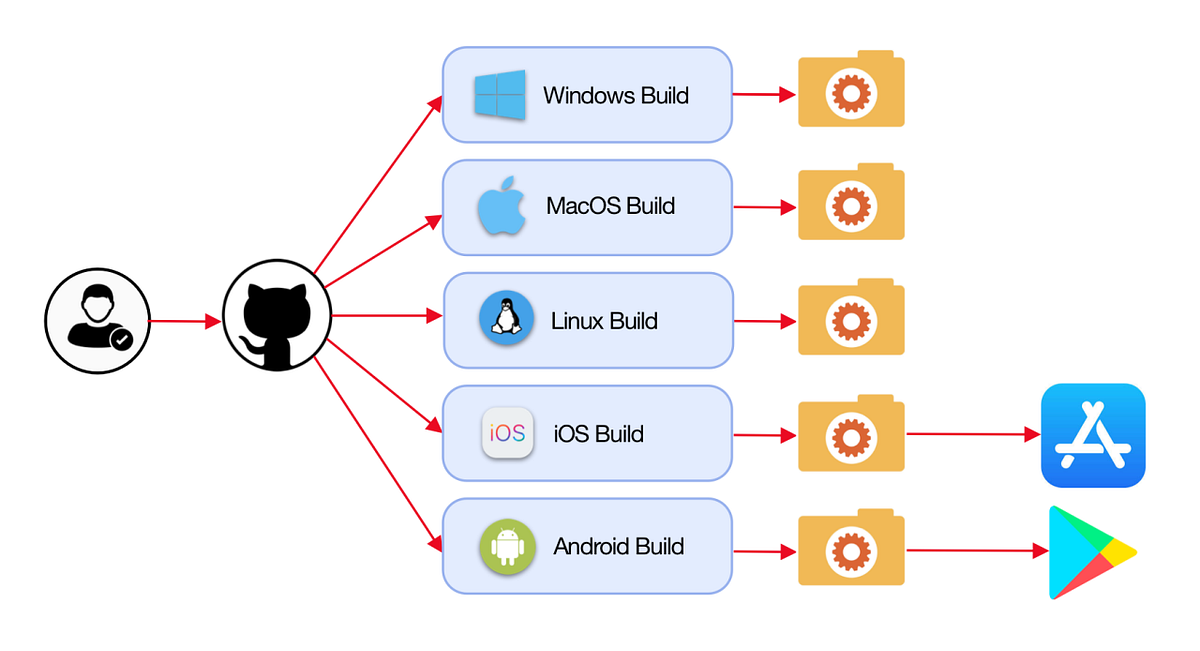
What does the GitHub Actions certification exam cover?
The GitHub Actions certification exam covers workflow syntax, triggers, jobs, steps, runners, secrets management, reusable workflows, environment protection rules, and GitHub-hosted and self-hosted runner management. It validates expertise in building CI/CD pipelines using GitHub Actions for automated software delivery.
The GitHub Actions Certification is an official GitHub certification validating proficiency in automating software workflows directly within GitHub repositories. GitHub Actions has rapidly become the dominant CI/CD platform for teams using GitHub, with millions of workflows running daily across open source and enterprise organizations.
DevOps engineers, platform engineers, and developers with GitHub Actions expertise automate everything from code testing and security scanning to deployment and infrastructure provisioning. The certification validates skills that are directly applicable to modern software delivery practices.
Exam Overview
| Detail | Information |
|---|---|
| Certification | GitHub Actions |
| Provider | GitHub (Microsoft) |
| Number of Questions | 40 |
| Time Limit | 60 minutes |
| Passing Score | 70% |
| Cost | $200 USD |
| Prerequisites | None |
| Validity | 2 years |
The exam covers five domains:
- Author and maintain workflows (40%)
- Consume workflows (20%)
- Author and maintain actions (25%)
- Manage GitHub Actions for the enterprise (15%)
"GitHub Actions rewards engineers who have built real pipelines. The certification tests not just workflow syntax, but the ability to design efficient workflows using caching, matrix builds, reusable workflows, and composite actions to avoid duplication across repositories. Understanding the execution model — especially how contexts, expressions, and outputs flow between steps and jobs — is essential for passing." -- GitHub Certified developer and DevOps lead
Workflow Fundamentals
Workflow YAML Structure
A GitHub Actions workflow is a YAML file stored in .github/workflows/:
name: CI Pipeline

on:
  push:
    branches: [main, develop]
  pull_request:
    branches: [main]
  schedule:
    - cron: '0 6 * * 1'    # Every Monday at 6 AM UTC
  workflow_dispatch:         # Manual trigger with optional inputs
    inputs:
      environment:
        description: 'Target environment'
        required: true
        type: choice
        options: [staging, production]

env:
  NODE_VERSION: '20'
  REGISTRY: ghcr.io

jobs:
  test:
    name: Run Tests
    runs-on: ubuntu-latest

    steps:
      - name: Checkout code
        uses: actions/checkout@v4

      - name: Setup Node.js
        uses: actions/setup-node@v4
        with:
          node-version: ${{ env.NODE_VERSION }}
          cache: 'npm'

      - name: Install dependencies
        run: npm ci

      - name: Run tests
        run: npm test

      - name: Upload coverage
        uses: actions/upload-artifact@v4
        with:
          name: coverage-report
          path: coverage/
          retention-days: 7
Event Triggers
| Trigger | Description | Common Use |
|---|---|---|
push |
Code pushed to branch | Run CI on every commit |
pull_request |
PR opened, updated, or synchronized | Validate before merge |
pull_request_target |
PR against protected branch (with repo permissions) | External fork PRs needing secrets |
schedule |
Cron-based timing | Nightly builds, scheduled scans |
workflow_dispatch |
Manual trigger | Deploy to specific environment |
workflow_call |
Called by another workflow | Reusable workflow |
release |
GitHub release created/published | Publish artifacts |
repository_dispatch |
External HTTP POST to GitHub API | External system triggers |
Contexts and Expressions
Contexts provide access to workflow metadata:
steps:
  - name: Context examples
    run: |
      echo "Repository: ${{ github.repository }}"
      echo "Branch: ${{ github.ref_name }}"
      echo "SHA: ${{ github.sha }}"
      echo "Actor: ${{ github.actor }}"
      echo "Event: ${{ github.event_name }}"
      echo "Runner OS: ${{ runner.os }}"
      echo "Run ID: ${{ github.run_id }}"
Key contexts:
| Context | Access | Examples |
|---|---|---|
github |
Workflow/repo metadata | github.actor, github.sha, github.event |
env |
Environment variables | env.MY_VAR |
vars |
Repository/org variables | vars.DEPLOY_REGION |
secrets |
Encrypted secrets | secrets.API_KEY |
inputs |
Workflow dispatch inputs | inputs.environment |
needs |
Previous job outputs | needs.build.outputs.image_tag |
steps |
Current job step outputs | steps.my_step.outputs.result |
Jobs and Steps
Job Dependencies and Outputs
jobs:
  build:
    runs-on: ubuntu-latest
    outputs:
      image-tag: ${{ steps.meta.outputs.tags }}
      image-digest: ${{ steps.build.outputs.digest }}
    steps:
      - name: Generate metadata
        id: meta
        uses: docker/metadata-action@v5
        with:
          images: ghcr.io/${{ github.repository }}

      - name: Build and push
        id: build
        uses: docker/build-push-action@v5
        with:
          push: true
          tags: ${{ steps.meta.outputs.tags }}

  deploy:
    needs: build           # Runs after 'build' job succeeds
    runs-on: ubuntu-latest
    environment: production
    steps:
      - name: Deploy
        run: |
          echo "Deploying image: ${{ needs.build.outputs.image-tag }}"
          echo "Digest: ${{ needs.build.outputs.image-digest }}"
Matrix Builds
Matrix strategy runs a job multiple times with different variable combinations:
jobs:
  test:
    strategy:
      matrix:
        os: [ubuntu-latest, windows-latest, macos-latest]
        node: ['18', '20', '22']
        exclude:
          - os: windows-latest
            node: '18'
      fail-fast: false    # Don't cancel all matrix jobs if one fails
      max-parallel: 4     # Run at most 4 jobs simultaneously

    runs-on: ${{ matrix.os }}
    name: Test Node ${{ matrix.node }} on ${{ matrix.os }}

    steps:
      - uses: actions/checkout@v4
      - uses: actions/setup-node@v4
        with:
          node-version: ${{ matrix.node }}
      - run: npm test
Conditional Execution
steps:
  # Only on main branch
  - name: Deploy to production
    if: github.ref == 'refs/heads/main'
    run: ./deploy.sh production

  # Only on failure
  - name: Notify on failure
    if: failure()
    uses: slackapi/slack-github-action@v1
    with:
      payload: '{"text": "Build failed!"}'

  # Always run (even after failure)
  - name: Cleanup
    if: always()
    run: rm -rf tmp/

  # Custom expression
  - name: Run security scan
    if: |
      github.event_name == 'pull_request' &&
      contains(github.event.pull_request.labels.*.name, 'security-review')
    run: ./security-scan.sh
Runners
GitHub-Hosted Runners
| Runner Label | OS | Resources |
|---|---|---|
ubuntu-latest |
Ubuntu 22.04 | 4 vCPU, 16 GB RAM, 14 GB SSD |
ubuntu-22.04 |
Ubuntu 22.04 | 4 vCPU, 16 GB RAM, 14 GB SSD |
ubuntu-20.04 |
Ubuntu 20.04 | 4 vCPU, 16 GB RAM, 14 GB SSD |
windows-latest |
Windows Server 2022 | 4 vCPU, 16 GB RAM, 14 GB SSD |
macos-latest |
macOS 14 (Sonoma) | 3 vCPU, 14 GB RAM, 14 GB SSD |
macos-14 |
macOS 14 (M1 runner) | 3 vCPU, 7 GB RAM, 14 GB SSD |
Larger runners (GitHub Team/Enterprise):
- Up to 64 vCPU, 256 GB RAM for compute-intensive workloads
- GPU runners for ML workflows
Self-Hosted Runners
Self-hosted runners run on your own infrastructure:
# Use self-hosted runner with labels
jobs:
  build:
    runs-on: [self-hosted, linux, x64, production]
Self-hosted runner setup:
# Download and configure runner
mkdir actions-runner && cd actions-runner
curl -o actions-runner-linux-x64-2.321.0.tar.gz -L \
  https://github.com/actions/runner/releases/download/v2.321.0/actions-runner-linux-x64-2.321.0.tar.gz
tar xzf ./actions-runner-linux-x64-2.321.0.tar.gz
./config.sh --url https://github.com/myorg/myrepo --token <TOKEN>
./run.sh    # Or install as service with ./svc.sh install
Security considerations for self-hosted runners:
- Never use self-hosted runners on public repositories (risk of malicious PRs)
- Run each job in isolated ephemeral containers
- Apply least-privilege permissions to runner service account
- Keep runner software updated
Secrets and Variables
Managing Secrets
jobs:
  deploy:
    runs-on: ubuntu-latest
    steps:
      - name: Configure AWS credentials
        uses: aws-actions/configure-aws-credentials@v4
        with:
          aws-access-key-id: ${{ secrets.AWS_ACCESS_KEY_ID }}
          aws-secret-access-key: ${{ secrets.AWS_SECRET_ACCESS_KEY }}
          aws-region: us-east-1

      - name: Login to container registry
        uses: docker/login-action@v3
        with:
          registry: ghcr.io
          username: ${{ github.actor }}
          password: ${{ secrets.GITHUB_TOKEN }}    # Auto-provided token
Secret scope hierarchy:
- Repository secrets: Available to workflows in that repository
- Environment secrets: Available only when using a specific environment
- Organization secrets: Available to selected or all repositories in the org
GITHUB_TOKEN: Automatically generated per-workflow token with permissions scoped to the repository. Default permissions can be customized:
permissions:
  contents: read
  packages: write
  id-token: write    # Required for OIDC-based cloud authentication
Reusable Workflows and Composite Actions
Reusable Workflows
Reusable workflows allow sharing entire workflow files across repositories:
# .github/workflows/deploy.yml (in shared repo)
on:
  workflow_call:
    inputs:
      environment:
        required: true
        type: string
      image-tag:
        required: true
        type: string
    secrets:
      DEPLOY_TOKEN:
        required: true

jobs:
  deploy:
    runs-on: ubuntu-latest
    environment: ${{ inputs.environment }}
    steps:
      - name: Deploy
        run: ./deploy.sh ${{ inputs.image-tag }} ${{ inputs.environment }}
        env:
          TOKEN: ${{ secrets.DEPLOY_TOKEN }}
Calling the reusable workflow:
jobs:
  call-deploy:
    uses: myorg/shared-workflows/.github/workflows/deploy.yml@main
    with:
      environment: production
      image-tag: ${{ needs.build.outputs.tag }}
    secrets:
      DEPLOY_TOKEN: ${{ secrets.DEPLOY_TOKEN }}
Composite Actions
Composite actions bundle multiple steps into a reusable action:
# action.yml in custom action repository
name: Setup and Test
description: Install dependencies and run tests

inputs:
  node-version:
    description: Node.js version
    default: '20'

runs:
  using: composite
  steps:
    - name: Setup Node.js
      uses: actions/setup-node@v4
      with:
        node-version: ${{ inputs.node-version }}
        cache: 'npm'

    - name: Install
      run: npm ci
      shell: bash

    - name: Test
      run: npm test
      shell: bash
Enterprise Management
Organization-Level Controls
Required workflows: Enforce workflow runs for all repositories in an organization.
Allowed actions policies: Control which actions can be used (GitHub-authored only, organization-owned, allowlist of specific actions).
Runner groups: Organize self-hosted runners and control which repositories can access them.
Environments and Protection Rules
jobs:
  deploy:
    environment:
      name: production
      url: https://myapp.com    # Shown in deployment status
    runs-on: ubuntu-latest
Environment protection rules:
- Required reviewers: Specific people or teams must approve before deployment proceeds
- Wait timer: Delay deployment by 0-43200 minutes
- Deployment branches: Restrict which branches can deploy to environment
- Environment secrets: Secrets available only to this environment
Frequently Asked Questions
How does GitHub Actions compare to Jenkins for enterprise CI/CD? GitHub Actions offers native integration with GitHub repositories, managed runners requiring no infrastructure maintenance, and a large marketplace of pre-built actions. Jenkins offers more customization, plugin ecosystem depth, and support for complex multi-platform builds beyond GitHub. Organizations already deep in GitHub workflows typically find GitHub Actions simpler. Those with complex builds, non-GitHub repos, or significant Jenkins investment often maintain Jenkins. Both coexist in many enterprises.
What is the difference between a composite action and a reusable workflow?
Composite actions bundle multiple steps into a single reusable action that runs within the calling job. They have access to the calling job's context, secrets, and environment. Reusable workflows are complete workflow files called as a job; they run in their own job context with their own runner and must explicitly receive secrets via the secrets parameter. Composite actions are better for step-level reuse; reusable workflows are better for job-level reuse across repositories.
How do I securely use cloud provider credentials in GitHub Actions?
The recommended approach is OpenID Connect (OIDC) federation rather than long-lived access keys. GitHub Actions can request short-lived tokens directly from AWS, Azure, or GCP using OIDC, eliminating stored credentials entirely. Configure the cloud provider to trust GitHub's OIDC issuer, then use id-token: write permission and cloud provider actions (aws-actions/configure-aws-credentials, azure/login) that automatically request OIDC tokens.
References
- GitHub. (2025). GitHub Actions Documentation. https://docs.github.com/en/actions
- GitHub. (2025). GitHub Actions Certification. https://resources.github.com/learn/certifications/
- GitHub. (2025). Security Hardening for GitHub Actions. https://docs.github.com/en/actions/security-guides/
- Kim, G., et al. (2021). The DevOps Handbook, 2nd Edition. IT Revolution Press.
- Humble, J., & Farley, D. (2010). Continuous Delivery. Addison-Wesley.
- GitHub. (2025). Reusing Workflows. https://docs.github.com/en/actions/using-workflows/reusing-workflows
Frequently Asked Questions
What does the GitHub Actions certification exam cover?
The GitHub Actions certification exam covers workflow syntax, triggers, jobs, steps, runners, secrets management, reusable workflows, environment protection rules, and GitHub-hosted and self-hosted runner management. It validates expertise in building CI/CD pipelines using GitHub Actions for automated software delivery.
How does GitHub Actions compare to Jenkins for enterprise CI/CD?
GitHub Actions offers native integration with GitHub repositories, managed runners requiring no infrastructure maintenance, and a large marketplace of pre-built actions. Jenkins offers more customization and plugin ecosystem depth. Organizations already deep in GitHub workflows typically find GitHub Actions simpler, while those with complex builds or significant Jenkins investment often maintain Jenkins.
What is the difference between a composite action and a reusable workflow?
Composite actions bundle multiple steps into a single reusable action that runs within the calling job. Reusable workflows are complete workflow files called as a job running in their own job context. Composite actions are better for step-level reuse; reusable workflows are better for job-level reuse across repositories.