
How is CKAD different from CKA?
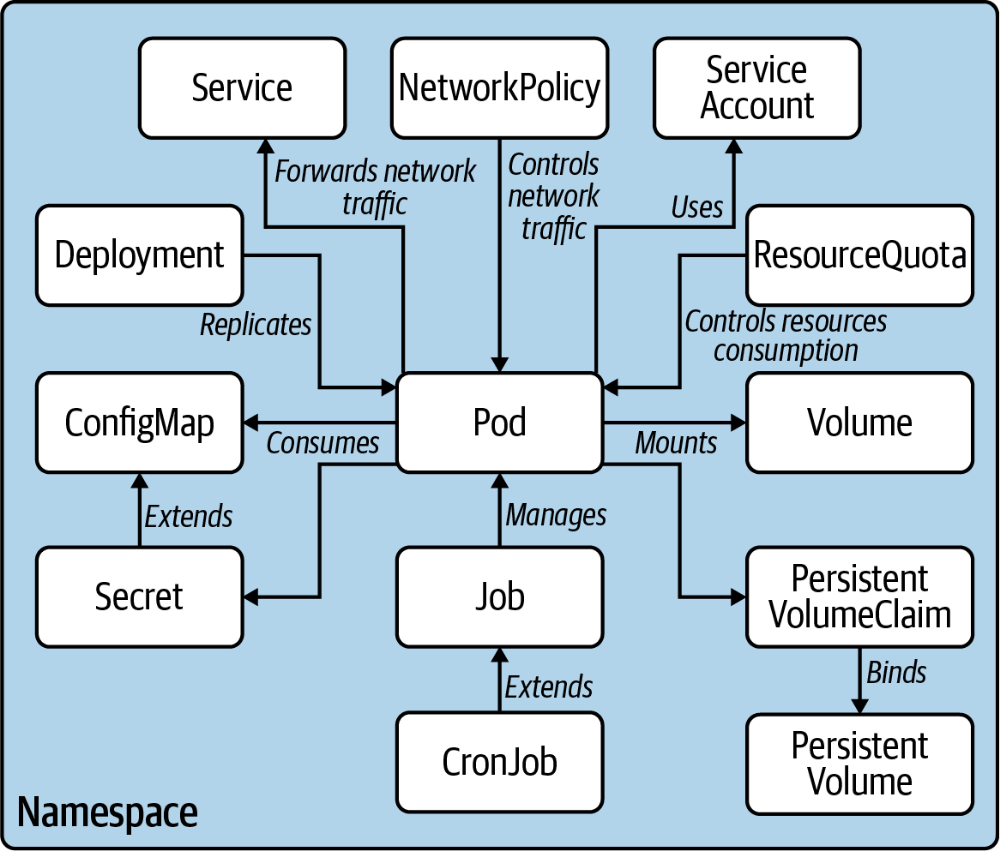
The CKAD (Certified Kubernetes Application Developer) focuses on designing, building, and deploying applications on Kubernetes from a developer perspective, while CKA (Certified Kubernetes Administrator) focuses on managing and operating the Kubernetes cluster itself. CKAD covers pods, deployments, services, config maps, persistent volumes, and application packaging. The 2-hour exam costs $395 USD and does not require CKA as a prerequisite.
The CKAD (Certified Kubernetes Application Developer) certification from the CNCF and Linux Foundation validates the skills required to design, build, configure, and expose cloud native applications on Kubernetes. Unlike CKA which focuses on cluster operations, CKAD focuses on the developer's interactions with Kubernetes.
Application developers, full-stack engineers, and DevOps engineers pursuing the CKAD demonstrate they can effectively deploy and manage containerized applications. The exam costs $395 USD and is valid for 2 years.
Exam Overview
| Detail | Information |
|---|---|
| Certification | CKAD - Certified Kubernetes Application Developer |
| Provider | CNCF / Linux Foundation |
| Exam Format | Performance-based (live kubectl commands) |
| Duration | 2 hours |
| Passing Score | 66% |
| Cost | $395 USD |
| Prerequisites | None (no CKA required) |
| Validity | 2 years |
The exam covers five domains:
- Application design and build (20%)
- Application deployment (20%)
- Application observability and maintenance (15%)
- Application environment, configuration, and security (25%)
- Services and networking (20%)
"CKAD success comes down to kubectl proficiency and speed. The exam has more questions than most candidates expect relative to the time limit. Practicing until you can run common kubectl commands from memory without referencing documentation is the single most important preparation activity." -- CKAD certified developer community
Domain 1: Application Design and Build (20%)
Pod Design
Creating pods imperatively (fastest for exam):
# Create a pod from a YAML manifest
kubectl run nginx-pod --image=nginx:1.25 --dry-run=client -o yaml > pod.yaml

# Apply the manifest
kubectl apply -f pod.yaml

# Run a pod with environment variables
kubectl run myapp --image=myapp:1.0 --env="DB_HOST=postgres" --env="DB_PORT=5432"

# Run a pod and expose port
kubectl run web --image=nginx --port=80

# Get pod logs
kubectl logs nginx-pod

# Execute command in pod
kubectl exec -it nginx-pod -- /bin/bash

# Delete pod
kubectl delete pod nginx-pod
Multi-container pod patterns:
- Sidecar: Helper container extending main container functionality (log shipper, proxy)
- Init container: Runs to completion before main containers start (database migration, dependency check)
- Ambassador: Proxy container handling external communication on behalf of main container
- Adapter: Transforms main container output for standardized monitoring
Init Containers
apiVersion: v1
kind: Pod
metadata:
  name: myapp-pod
spec:
  initContainers:
    - name: init-db-check
      image: busybox:1.36
      command: ['sh', '-c',
        'until nc -z postgres-service 5432; do echo waiting for database; sleep 2; done']
  containers:
    - name: app
      image: myapp:1.0
      ports:
        - containerPort: 8080
Domain 2: Application Deployment (20%)
Deployments
# Create deployment imperatively
kubectl create deployment web --image=nginx:1.25 --replicas=3

# Scale deployment
kubectl scale deployment web --replicas=5

# Set image (trigger rolling update)
kubectl set image deployment/web nginx=nginx:1.26

# Watch rollout status
kubectl rollout status deployment/web

# Rollback to previous version
kubectl rollout undo deployment/web

# Rollback to specific revision
kubectl rollout undo deployment/web --to-revision=2

# View rollout history
kubectl rollout history deployment/web
Deployment strategy configuration:
spec:
  strategy:
    type: RollingUpdate
    rollingUpdate:
      maxSurge: 1        # Max pods above desired during update
      maxUnavailable: 0  # Max pods unavailable during update (zero-downtime)
Horizontal Pod Autoscaling
# Create HPA targeting 70% CPU
kubectl autoscale deployment web --cpu-percent=70 --min=2 --max=10

# View HPA status
kubectl get hpa

# Check HPA details
kubectl describe hpa web
apiVersion: autoscaling/v2
kind: HorizontalPodAutoscaler
metadata:
  name: web-hpa
spec:
  scaleTargetRef:
    apiVersion: apps/v1
    kind: Deployment
    name: web
  minReplicas: 2
  maxReplicas: 10
  metrics:
    - type: Resource
      resource:
        name: cpu
        target:
          type: Utilization
          averageUtilization: 70
Domain 3: Application Observability and Maintenance (15%)
Liveness and Readiness Probes
containers:
  - name: app
    image: myapp:1.0
    livenessProbe:
      httpGet:
        path: /health
        port: 8080
      initialDelaySeconds: 30
      periodSeconds: 10
      failureThreshold: 3
    readinessProbe:
      httpGet:
        path: /ready
        port: 8080
      initialDelaySeconds: 5
      periodSeconds: 5
    startupProbe:
      httpGet:
        path: /started
        port: 8080
      failureThreshold: 30
      periodSeconds: 10
- Liveness probe: Determines if container is running; failed probe restarts container
- Readiness probe: Determines if container is ready to serve traffic; failed probe removes from service endpoints
- Startup probe: Determines if application has started; allows slow-starting containers more time
Logging and Debugging
# View pod logs
kubectl logs <pod-name>

# Stream logs
kubectl logs -f <pod-name>

# Logs from previous container (after crash)
kubectl logs <pod-name> --previous

# Logs from specific container in multi-container pod
kubectl logs <pod-name> -c <container-name>

# Describe pod events
kubectl describe pod <pod-name>

# Get pod in specific namespace
kubectl get pods -n kube-system

# All pods across all namespaces
kubectl get pods -A

# Pod resource usage
kubectl top pods
kubectl top nodes
Domain 4: Application Environment, Configuration, and Security (25%)
ConfigMaps and Secrets
# Create ConfigMap from literal values
kubectl create configmap app-config --from-literal=DB_HOST=postgres --from-literal=DB_PORT=5432

# Create ConfigMap from file
kubectl create configmap nginx-config --from-file=nginx.conf

# Create Secret
kubectl create secret generic db-credentials --from-literal=username=admin --from-literal=password=secret123

# Create TLS secret
kubectl create secret tls app-tls --cert=tls.crt --key=tls.key
Using ConfigMaps and Secrets in pods:
containers:
  - name: app
    image: myapp:1.0
    envFrom:
      - configMapRef:
          name: app-config
      - secretRef:
          name: db-credentials
    volumeMounts:
      - name: config-volume
        mountPath: /etc/config
volumes:
  - name: config-volume
    configMap:
      name: app-config
Pod Security Context
spec:
  securityContext:
    runAsNonRoot: true
    runAsUser: 1000
    fsGroup: 3000
  containers:
    - name: app
      image: myapp:1.0
      securityContext:
        allowPrivilegeEscalation: false
        readOnlyRootFilesystem: true
        capabilities:
          drop:
            - ALL
Resource Limits and Requests
containers:
  - name: app
    image: myapp:1.0
    resources:
      requests:
        memory: "64Mi"
        cpu: "250m"
      limits:
        memory: "128Mi"
        cpu: "500m"
- Requests: Minimum resources guaranteed to the container; used for scheduling
- Limits: Maximum resources the container can use; exceeding memory limit kills the container
Domain 5: Services and Networking (20%)
Service Types
| Type | Description | Use Case |
|---|---|---|
| ClusterIP | Internal IP accessible within cluster only | Internal service communication |
| NodePort | Exposes on each node's IP at static port | Development and external access without load balancer |
| LoadBalancer | Cloud provider load balancer with external IP | Production external access |
| ExternalName | Maps to external DNS name | Accessing external services by Kubernetes service name |
# Expose deployment as service
kubectl expose deployment web --port=80 --type=ClusterIP

# Create service imperatively
kubectl create service clusterip web --tcp=80:8080

# Port-forward for local testing
kubectl port-forward pod/web-pod 8080:80
kubectl port-forward service/web 8080:80
Ingress
apiVersion: networking.k8s.io/v1
kind: Ingress
metadata:
  name: app-ingress
  annotations:
    nginx.ingress.kubernetes.io/rewrite-target: /
spec:
  ingressClassName: nginx
  rules:
    - host: app.example.com
      http:
        paths:
          - path: /api
            pathType: Prefix
            backend:
              service:
                name: api-service
                port:
                  number: 8080
          - path: /
            pathType: Prefix
            backend:
              service:
                name: frontend-service
                port:
                  number: 80
Frequently Asked Questions
How long should I prepare for CKAD? Most candidates need 4-8 weeks of preparation, assuming basic familiarity with containers and Linux. The exam is hands-on, requiring fast kubectl command execution. Practice until you can write common pod, deployment, service, and configmap YAML from memory or generate it quickly with kubectl dry-run. KillerCoda's CKAD practice scenarios and killer.sh practice exams are strongly recommended.
Can I take CKAD without CKA? Yes, CKAD has no prerequisite and can be taken without CKA. The two certifications test different knowledge: CKAD focuses on developer usage of Kubernetes while CKA focuses on cluster administration. Many candidates find CKAD slightly easier because the kubectl commands are more familiar to application developers. Some candidates take CKAD before CKA intentionally.
What kubectl generator commands should I master for CKAD?
The most valuable generators for CKAD speed are: kubectl run for pods, kubectl create deployment for deployments, kubectl create service for services, kubectl create configmap for config maps, kubectl create secret generic for secrets, kubectl expose for quick service creation. Using --dry-run=client -o yaml > file.yaml generates YAML that you can edit rather than writing from scratch.
References
- CNCF/Linux Foundation. (2025). CKAD Curriculum. https://github.com/cncf/curriculum
- Linux Foundation. (2025). CKAD Certification. https://training.linuxfoundation.org/certifications/certified-kubernetes-application-developer-ckad/
- Kubernetes Documentation. (2025). https://kubernetes.io/docs/
- Huss, B. (2023). Certified Kubernetes Application Developer (CKAD) Study Guide. O'Reilly Media.
- KillerCoda. (2025). CKAD Scenarios. https://killercoda.com/killer-shell-ckad
- Killer.sh. (2025). CKAD Practice Exam. https://killer.sh/ckad
Frequently Asked Questions
How is CKAD different from CKA?
CKAD focuses on designing, building, and deploying applications on Kubernetes from a developer perspective. CKA focuses on managing and operating the Kubernetes cluster itself. CKAD covers pods, deployments, services, ConfigMaps, and application packaging. The 2-hour exam costs $395 USD and does not require CKA.
How long should I prepare for CKAD?
Most candidates need 4-8 weeks of preparation with basic container and Linux familiarity. Practice until you can execute common kubectl commands from memory. KillerCoda CKAD practice scenarios and killer.sh practice exams are strongly recommended for exam readiness.
Can I take CKAD without CKA?
Yes, CKAD has no prerequisites and can be taken without CKA. The certifications test different knowledge. Many candidates find CKAD slightly easier because kubectl commands are familiar to application developers. Some candidates take CKAD intentionally before CKA.