
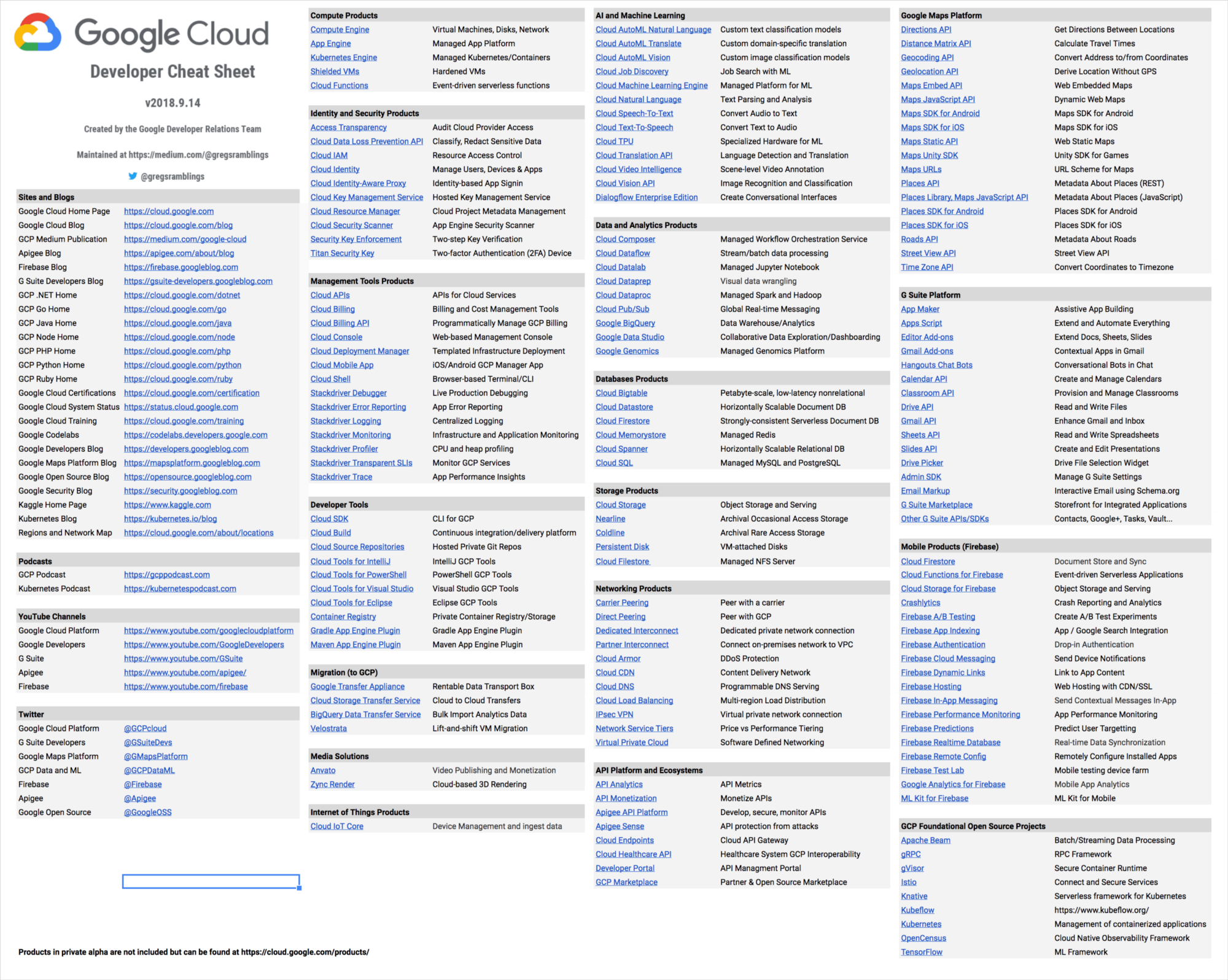
What are the key topics to memorize for the Google Cloud ACE exam?
The Google Cloud Associate Cloud Engineer exam tests service selection, deployment commands, IAM role assignments, and billing management. Key memorization targets: the gcloud command structure, the compute vs storage vs database service selection criteria, VPC subnet and firewall rule configuration, IAM role hierarchy (Organization/Folder/Project/Resource), and the difference between Cloud Run, App Engine, and GKE deployment models.
This reference sheet organizes the most frequently tested Associate Cloud Engineer (ACE) concepts into tables and quick-reference blocks. The ACE exam focuses on practical knowledge: deploying resources, managing infrastructure, monitoring systems, and controlling costs. Use this sheet for final-week review after completing your full study plan.
Compute Service Selection
| Scenario | Service | Key Detail |
|---|---|---|
| Full OS control, custom configuration | Compute Engine | IaaS, VMs with configurable CPU/RAM/GPU |
| Containerized apps, team knows Kubernetes | GKE Standard | Managed Kubernetes, user manages nodes |
| Containers, no node management | GKE Autopilot | Google manages nodes, pay-per-pod |
| Stateless HTTP containers, scale to zero | Cloud Run | Serverless containers, HTTP trigger |
| Web app, standard runtimes, rapid scale | App Engine Standard | PaaS, sandboxed, fast cold start |
| Web app, custom runtime or dependencies | App Engine Flexible | Docker-based, slower scaling |
| Simple event-driven code, no containers | Cloud Functions | Serverless functions, event triggers |
Storage Service Selection
| Data Type | Service | Storage Class |
|---|---|---|
| Objects, files, unstructured data | Cloud Storage | Standard/Nearline/Coldline/Archive |
| Block storage for a single VM | Persistent Disk | Standard/Balanced/SSD/Extreme |
| Shared file system (NFS) across VMs | Filestore | Basic HDD/SSD, Enterprise |
| Data warehouse, analytics SQL | BigQuery | Managed columnar storage |
Cloud Storage access frequency guide:
- Standard: daily access or more frequent
- Nearline: once per month or less
- Coldline: once per quarter or less
- Archive: once per year or less; retrieval costs highest
Database Service Selection
| Use Case | Service | Type |
|---|---|---|
| MySQL/PostgreSQL/SQL Server (managed) | Cloud SQL | Relational, OLTP |
| Global relational, financial transactions | Cloud Spanner | Relational, globally distributed |
| Time-series, IoT, AdTech at scale | Bigtable | Wide-column NoSQL |
| Mobile/web app real-time data | Firestore (Native) | Document NoSQL |
| Backend document storage | Firestore (Datastore mode) | Document NoSQL |
| Session cache, leaderboards | Memorystore | Redis or Memcached |
| Analytics on large datasets | BigQuery | Data warehouse |
"The most common exam question type asks you to select between Cloud SQL and Cloud Spanner. Choose Cloud SQL when the workload is existing relational and regional; choose Cloud Spanner when global distribution, horizontal scalability, or strong consistency across regions is required." -- ACE exam preparation guidance
gcloud CLI Reference
Configuration:
gcloud config set project PROJECT_ID
gcloud config set compute/zone ZONE
gcloud config list
gcloud config configurations create NAME
gcloud config configurations activate NAME
Compute Engine:
gcloud compute instances create NAME --zone=ZONE --machine-type=TYPE
gcloud compute instances list
gcloud compute instances start/stop NAME
gcloud compute instances describe NAME
gcloud compute instances delete NAME
gcloud compute ssh NAME --zone=ZONE
GKE:
gcloud container clusters create NAME --zone=ZONE --num-nodes=3
gcloud container clusters get-credentials NAME --zone=ZONE
gcloud container clusters resize NAME --num-nodes=N
gcloud container clusters delete NAME
kubectl apply -f deployment.yaml
kubectl get pods
kubectl get services
Cloud Storage:
gsutil mb gs://BUCKET_NAME
gsutil cp LOCAL_FILE gs://BUCKET/
gsutil cp -r gs://BUCKET/ LOCAL_DIR
gsutil ls gs://BUCKET
gsutil rm gs://BUCKET/OBJECT
gsutil acl ch -u USER:PERMISSION gs://BUCKET/
IAM:
gcloud projects add-iam-policy-binding PROJECT --member=MEMBER --role=ROLE
gcloud projects get-iam-policy PROJECT
gcloud iam roles list --project=PROJECT
gcloud iam service-accounts create NAME
gcloud iam service-accounts keys create KEY_FILE --iam-account=SA_EMAIL
IAM Quick Reference
Role types:
- Basic roles: Owner, Editor, Viewer (broad permissions, avoid in production)
- Predefined roles: service-specific (e.g., roles/compute.admin, roles/storage.objectViewer)
- Custom roles: organization-defined, principle of least privilege
Common predefined roles:
| Role | Access |
|---|---|
| roles/owner | Full access plus billing |
| roles/editor | Full access except billing and IAM |
| roles/viewer | Read-only |
| roles/compute.admin | Full Compute Engine management |
| roles/compute.instanceAdmin | Instance management (no networking) |
| roles/storage.admin | Full Cloud Storage management |
| roles/storage.objectViewer | Read objects only |
| roles/iam.serviceAccountUser | Use service accounts as identity |
| roles/container.admin | Full GKE management |
| roles/bigquery.dataViewer | Read BigQuery data |
Member types:
user:EMAIL-- Google AccountserviceAccount:SA_EMAIL-- Service accountgroup:GROUP_EMAIL-- Google Groupdomain:DOMAIN-- Cloud Identity/G Suite domainallUsers-- anyone (anonymous included)allAuthenticatedUsers-- any authenticated Google account
Policy hierarchy: Organization > Folder > Project > Resource
- Permissions inherited downward
- Cannot restrict inherited permissions with allow policies (use deny policies)
VPC and Networking
VPC basics:
- VPC is a global resource in Google Cloud
- Subnets are regional (one subnet spans all zones in a region)
- Each VPC has an implied deny-all ingress and allow-all egress rule
Firewall rules:
- Direction: INGRESS or EGRESS
- Action: ALLOW or DENY
- Priority: 0-65535 (lower = higher priority); default rules at 65534/65535
- Targets: all instances, instances by tag, instances by service account
Common firewall scenarios:
# Allow SSH from specific IP
gcloud compute firewall-rules create allow-ssh \
  --allow tcp:22 \
  --source-ranges=203.0.113.0/24 \
  --target-tags=ssh-access

# Allow HTTP from anywhere
gcloud compute firewall-rules create allow-http \
  --allow tcp:80 \
  --source-ranges=0.0.0.0/0 \
  --target-tags=http-server
VPC types:
- Default VPC: auto-created per project, pre-configured subnets in each region
- Auto mode VPC: subnets created automatically in each region
- Custom mode VPC: you define all subnets and CIDR ranges
Shared VPC: Centralized network management; host project owns VPC, service projects use it.
VPC Peering: Connect two VPCs (same or different projects/organizations). Not transitive.
Cloud Monitoring and Logging
Key services:
- Cloud Monitoring: metrics, dashboards, alerting policies, uptime checks
- Cloud Logging: log management, log sinks, log-based metrics
- Cloud Trace: distributed request tracing
- Cloud Profiler: continuous CPU and memory profiling
- Error Reporting: real-time error tracking from application logs
Log types:
- Audit logs: Admin Activity (always on), Data Access (must enable), System Event, Policy Denied
- Application logs: written by applications to Cloud Logging
- Agent logs: from Ops Agent on Compute Engine instances
Admin Activity audit logs are always enabled and cannot be disabled. Data Access audit logs must be explicitly enabled and are excluded from free tier. For compliance scenarios, explicitly enabling Data Access logging is usually required.
Alerting policy creation:
gcloud monitoring policies create --policy-from-file=POLICY_FILE
Policies can trigger: email, PagerDuty, Pub/Sub, webhooks, SMS.
Billing and Cost Management
Key billing concepts:
- Billing account: pays for resources; linked to projects
- Budget alerts: notify when spending reaches thresholds (50%, 90%, 100%, custom)
- Sustained Use Discounts (SUD): automatic discount for Compute Engine instances running most of the month (up to 30%)
- Committed Use Discounts (CUD): 1-year or 3-year commitment, 20-57% off on-demand price
- Preemptible/Spot VMs: 60-91% cheaper; can be terminated by Google with 30-second warning
Cost optimization strategies:
- Right-size instances using Cloud Monitoring CPU utilization
- Delete unattached persistent disks
- Set lifecycle policies on Cloud Storage buckets
- Use Cloud SQL instance scheduling for dev/test environments
- Export billing data to BigQuery for custom analysis
Budget alert CLI:
gcloud billing budgets create \
  --billing-account=BILLING_ACCOUNT_ID \
  --display-name="Monthly Budget" \
  --budget-amount=500USD \
  --threshold-rule=percent=50 \
  --threshold-rule=percent=90 \
  --threshold-rule=percent=100
Deployment Manager and Infrastructure as Code
Cloud Deployment Manager: Google-native IaC using YAML or Jinja2/Python templates.
Terraform on Google Cloud: Most common IaC choice; uses HCL.
Cloud Build: Managed CI/CD service.
- Triggered by Cloud Source Repositories, GitHub, Bitbucket
- Uses
cloudbuild.yamlfor build steps
Artifact Registry: Managed container image and package registry (replaces Container Registry).
Exam Quick Tips
Frequently confused pairs:
- Cloud Run vs App Engine Standard: Cloud Run uses containers; App Engine Standard uses pre-built runtimes
- GKE Autopilot vs Cloud Run: Autopilot still runs Kubernetes pods; Cloud Run is fully serverless
- Nearline vs Coldline: Nearline = monthly access; Coldline = quarterly access
- Cloud SQL vs Cloud Spanner: SQL = regional relational; Spanner = global relational
- Firestore Native vs Datastore mode: Native mode for mobile/web clients; Datastore mode for server applications
gcloud vs gsutil vs bq:
- gcloud: general GCP management (compute, GKE, IAM, etc.)
- gsutil: Cloud Storage operations
- bq: BigQuery operations
"The ACE exam frequently asks about the correct gcloud command for a task, including required flags. Memorize the core commands for compute instances, GKE clusters, and Cloud Storage operations. Practice these in Google Cloud Shell before exam day." -- Google Cloud Certified ACE candidate advice
Frequently Asked Questions
What percentage of the ACE exam is hands-on practical vs conceptual? The ACE exam is entirely multiple-choice and scenario-based -- there is no live environment component. However, many questions describe a situation (a company needs X) and ask which command or configuration achieves it, making practical gcloud knowledge essential. Candidates who have deployed resources in Google Cloud Shell perform significantly better on command-related questions.
Are there free resources to study for the ACE exam? Google provides free study materials including the official exam guide, sample questions, and Coursera training through Google Cloud Skills Boost (with a free trial). The Google Cloud documentation is comprehensive and freely available. Qwiklabs/Cloud Skills Boost provides hands-on labs with free credits for new users.
How often do Google Cloud services change between exam versions? Google Cloud updates exam content periodically but not continuously. Check the official ACE exam guide on cloud.google.com/learn/certification for the current exam version and any recently added topics. The core services tested have been relatively stable, but new services (like GKE Autopilot or Cloud Run Jobs) are added as they reach general availability.
References
- Google Cloud. (2024). Associate Cloud Engineer Exam Guide. https://cloud.google.com/learn/certifications/cloud-engineer
- Google Cloud. (2024). gcloud CLI Reference Documentation. https://cloud.google.com/sdk/gcloud/reference
- Sullivan, D. (2022). Official Google Cloud Certified Associate Cloud Engineer Study Guide, 2nd Edition. Sybex/Wiley.
- Google Cloud. (2024). Cloud IAM Documentation. https://cloud.google.com/iam/docs
- Google Cloud. (2024). VPC Network Overview. https://cloud.google.com/vpc/docs/vpc
- Google Cloud. (2024). Cloud Billing Documentation. https://cloud.google.com/billing/docs
Frequently Asked Questions
What are the key topics to memorize for the Google Cloud ACE exam?
Key memorization targets: the gcloud command structure, compute vs storage vs database service selection criteria, VPC subnet and firewall rule configuration, IAM role hierarchy, and the difference between Cloud Run, App Engine, and GKE deployment models.
What percentage of the ACE exam is hands-on practical vs conceptual?
The ACE exam is entirely multiple-choice and scenario-based with no live environment component. However, many questions describe a situation and ask which command achieves it, making practical gcloud knowledge essential for candidates.
Are there free resources to study for the ACE exam?
Google provides free study materials including the official exam guide, sample questions, and Coursera training through Google Cloud Skills Boost. The Google Cloud documentation is comprehensive and free. Qwiklabs provides hands-on labs with free credits for new users.